
Beyond the Remote Desktop: What Researchers Actually Need From a Secure Environment
A secure remote desktop is a useful starting point, but researchers also need scalable compute, GPUs, storage, specialist apps and cost visibility. See how self-service within IT guardrails improves adoption and keeps research inside the secure environment.

When an institution stands up its first secure research environment, there's a very sensible-sounding way to start: give everyone a remote desktop. Spin up a virtual desktop service, let researchers connect over the web or a client, and promise to build out "other services if the need arises".
It's a reasonable first step. It's also where many environments stall, because researchers need a lot more than a desktop, and the gap tends to get filled with tickets, delays, and eventually workarounds nobody in compliance wants to hear about.
In this post we'll look at what a desktop-only start gives you, what researchers actually ask for next, and why the difference matters for adoption.
This post is for central research IT teams planning or growing a secure environment.
What a desktop-only start gives you
Amazon WorkSpaces is a solid service. It provides Windows or Linux virtual desktops, accessed from a web browser or client, with options for MFA, KMS encryption and IP-based access controls. It's HIPAA eligible and assessed under several AWS compliance programs.
So as a secure place to log in, open files and run modest analyses, it does the job. The trouble starts when the research gets bigger than the desktop.
What researchers ask for next
Within weeks, the requests usually look something like this:
- "My model needs a GPU."
- "Can I run this on 200 cores overnight?"
- "I need RStudio Server / JupyterLab / this specific version of Python."
- "Where do I put 4 TB of imaging data?"
- "My collaborator needs access, but only to this project."
- "How much have I spent, and will I blow my grant budget?"
Each of these is reasonable. In a desktop-only model, each becomes a ticket. Someone in IT designs a solution, builds it, secures it, documents it, and then does it again for the next researcher with a slightly different need. If you depend heavily on a third party for this work because you don't have the in-house people, each request may also become a change order.
Side by side
| Need | Desktop-only environment | Self-service research platform (e.g. RONIN) |
|---|---|---|
| Secure place to work | Yes | Yes, including RONIN Isolate desktops |
| Bigger compute | Resize desktop, or raise a ticket | Pick an approved machine size and launch it |
| GPUs for AI and imaging | Ticket and custom build | AI machines with GPUs from a menu |
| HPC | Ticket and custom build | Autoscaling Slurm clusters |
| Apps like RStudio and Jupyter | Install on the desktop, or a ticket | RStudio and Jupyter machines ready to go |
| Large data storage | Desktop disk, or a ticket | Object storage and drives per project |
| Project separation | Usually by desktop or directory | Projects with their own users, resources and budgets |
| Cost visibility for researchers | Rarely | Budgets, forecasts and notifications per project |
| Time to new capability | Days to months | Minutes, within guardrails IT has set |
The point isn't that desktops are bad. Researchers still want them, and RONIN offers remote desktops too. The point is that a desktop is one tool among many, not the whole environment.
The adoption risk nobody budgets for
Here's the bit that worries us most. If your secure environment is painful to use, researchers won't stop doing research. They'll do it somewhere else.
If you force everyone through the most restrictive, slowest path, people split off and use personal Dropbox, a laptop under the desk, or a credit card cloud account. That's the outcome a secure environment was supposed to prevent, and it's invisible until something goes wrong.
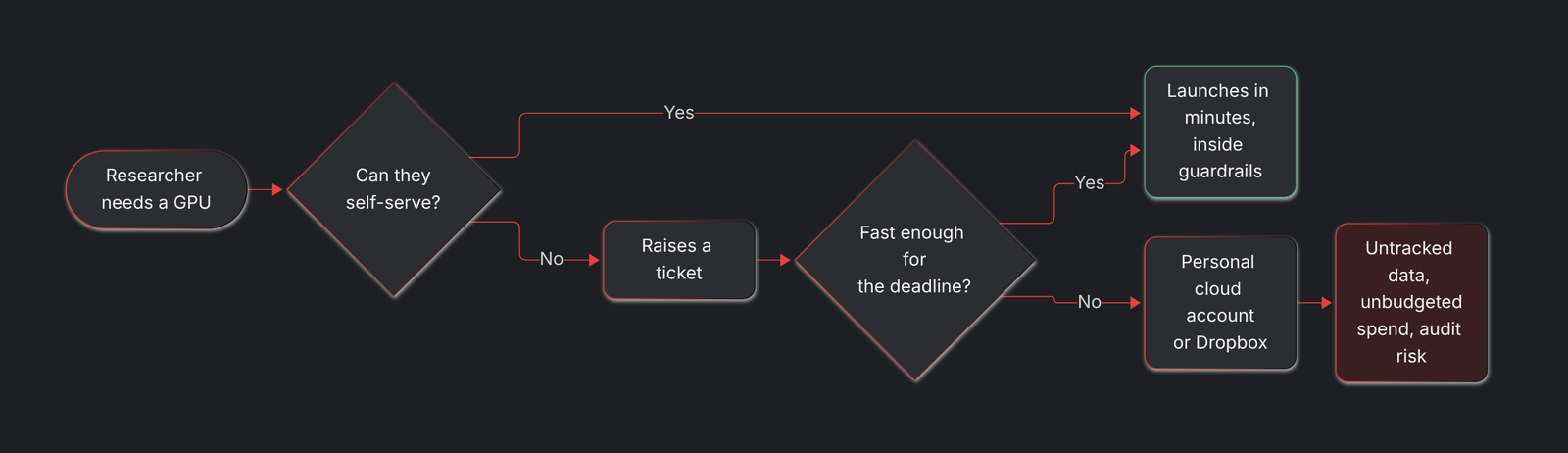
When the secure path is too slow, research goes somewhere you can't see.
Good security that people actually use beats perfect security they route around. A big part of being "compliant" is simply keeping researchers inside the environment where your controls apply.
Matching controls to the work
Not every project needs the same level of lockdown. A desktop-only model often defaults to the strictest settings for everyone, because it's simpler to manage one configuration.
A platform with project separation lets you be proportionate. RONIN can be deployed into separate AWS accounts for different compliance tiers, so an open-data methods project doesn't have to live under the same restrictions as a project handling identifiable clinical records. Within each tier, admins decide which machine types, operating systems and software are available, and researchers choose from that menu.
What a good next step looks like
If you've started with desktops, you haven't made a mistake. You've made a start. A sensible next step is to add self-service on top, rather than building each capability by hand:
- Keep the foundation. Accounts, guardrails, networking and logging, ideally on an AWS-standard landing zone like the Landing Zone Accelerator.
- Add a researcher self-service layer with projects, budgets, approved compute and storage, and common apps.
- Keep desktops for the people who want them, and for secure Isolate work.
- Measure adoption. If researchers are using the environment, your controls are working. If they're not, find out where they went.
What this really means
- A remote desktop is a good front door, but research needs compute, storage, apps and budgets behind it.
- Building each request by hand doesn't scale, especially without a large in-house team.
- If the secure path is painful, researchers will find an insecure one.
- Self-service within guardrails keeps them inside and keeps IT in control.
Next steps
If you're running a desktop-first environment and the tickets are starting to pile up, get in touch. We'd love to show you what self-service looks like in practice.