
Securing GPU Capacity on AWS: A Guide to Capacity Reservations and Capacity Blocks with RONIN
Learn how AWS Capacity Reservations and Capacity Blocks work, when to use each option, and the implications for RONIN users securing GPU capacity for AI, research, teaching, and visualisation workloads.

As demand for AI, machine learning, visualisation, simulation, and teaching environments continues to grow, one question we are hearing increasingly often from RONIN customers is:
How can I guarantee access to GPUs when I need them?
Whether you're scheduling a large-scale training run on NVIDIA H100 GPUs, preparing a university lab for your students, or planning a workshop that requires high-performance graphics instances, securing capacity ahead of time has become an important consideration.
AWS provides several mechanisms for reserving compute capacity in advance, but each option comes with different pricing models, operational requirements, and implications when used alongside RONIN.
This guide explains the available options, how they work, and what you should consider before making a reservation.
Why Capacity Reservations Matter
Most AWS instances are launched on-demand. In normal circumstances this works well, but highly sought-after resources can become difficult to obtain during periods of high demand.
This is particularly relevant for:
- NVIDIA H100 GPU instances (P5 family)
- Other accelerator-based machine learning instances
- Large classroom environments
- Time-sensitive research projects
- Scheduled workshops or training events
- Rendering and visualisation workloads
Capacity reservations allow you to reserve AWS infrastructure ahead of time so that capacity is available when you need it.
Understanding Your Options
AWS currently provides three primary approaches for reserving capacity:
|
Option |
Capacity Guaranteed? |
Schedule in Advance? |
Minimum Duration |
Best For |
|---|---|---|---|---|
|
Immediate On-Demand Capacity Reservation |
Only if reservation succeeds |
No |
No minimum |
Short-term requirements when capacity is currently available |
|
Future-Dated On-Demand Capacity Reservation |
No guarantee until reservation succeeds |
Yes |
14 days |
Planned projects requiring standard EC2 instances |
|
EC2 Capacity Blocks for ML |
Yes |
Yes |
1 day |
High-demand GPU workloads |
Each option behaves differently.
Option 1: Immediate On-Demand Capacity Reservations
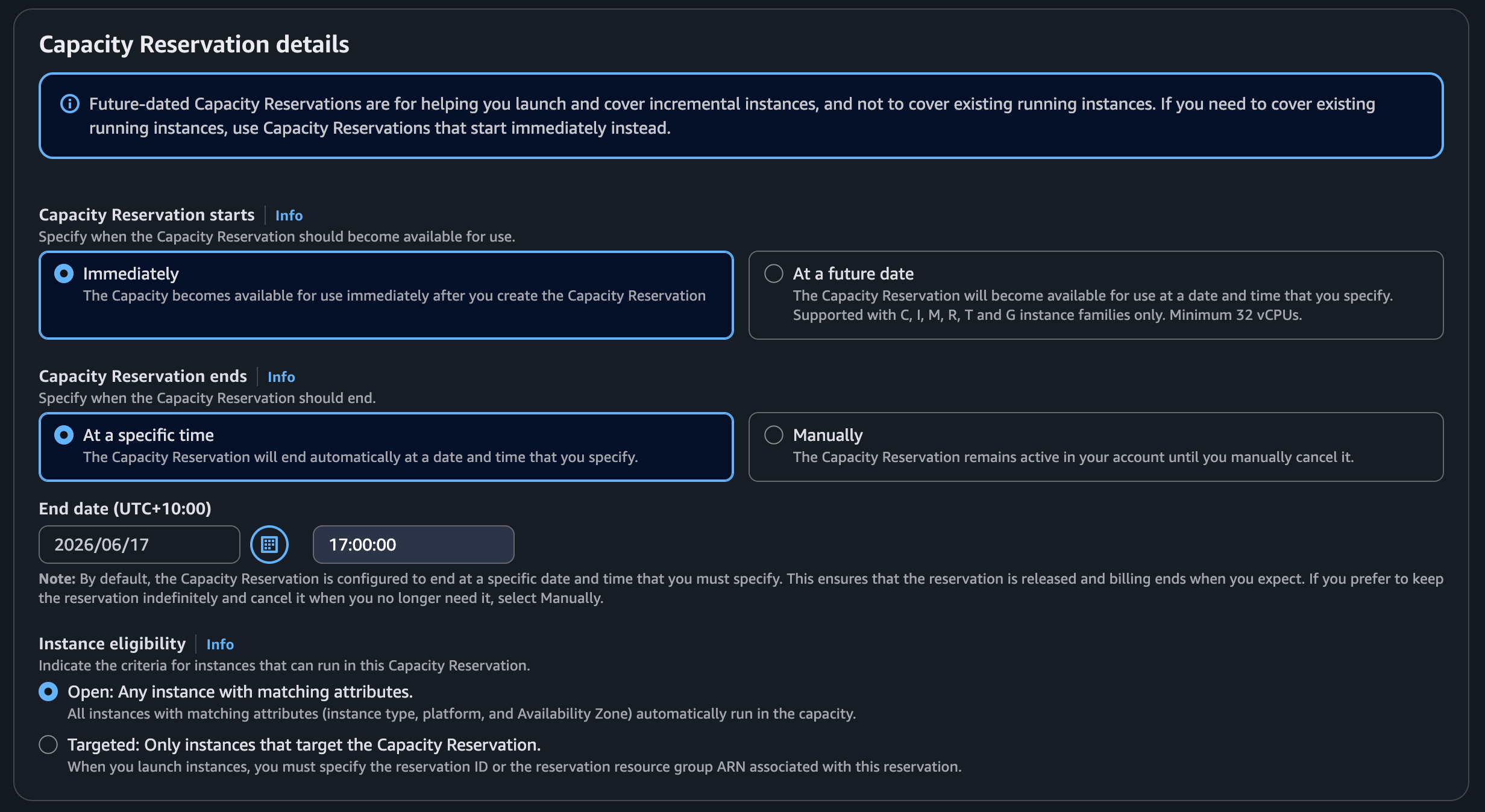
An immediate On-Demand Capacity Reservation attempts to reserve available capacity right now.
If AWS has sufficient spare capacity, the reservation is created immediately and matching instances can consume that reservation.
Advantages
- No minimum reservation period
- Can be cancelled manually at any time through the AWS Console, or configured with a specified end date
- Works with standard EC2 pricing
- Integrates automatically with RONIN when configured as an open reservation
- Suitable for short-term requirements
Limitations
- Capacity must exist at the moment the reservation is requested
- Popular GPU instance types may not be available
- Reservation creation can fail during periods of high demand
Open vs Targeted Reservations
AWS supports two reservation modes for their immediate on-demand capacity reservations
Open Reservations
Open reservations are generally the simplest option for RONIN users.
For open reservations, RONIN works automatically.
Any matching instance can consume the reservation if:
- Instance type matches
- Platform matches
- Availability Zone matches
RONIN users do not need to take any special action - they can continue starting and stopping instances through RONIN as normal.
The reservation is automatically consumed by the first matching instance/s launched/started by users.
Targeted Reservations:
Targeted Reservations require instances to explicitly target a specific Capacity Reservation.
Unlike Open Reservations, matching instances will not automatically consume the reserved capacity. Instead, instances must be configured to target a specific Capacity Reservation ID or Capacity Reservation Resource Group ARN.
Targeted Reservations can be useful when capacity needs to be dedicated to:
- A specific user
- A particular research group
- A single RONIN project
- Critical workloads that should not compete with other users for reserved capacity
For most RONIN deployments, Open Reservations are typically the preferred approach because they integrate seamlessly with existing RONIN workflows.
If you need to dedicate reserved capacity to a particular RONIN project, the recommended approach is to:
- Create the Targeted Capacity Reservation in AWS.
- Launch the required instance through RONIN as normal and then make sure it is stopped.
- In the AWS Console, locate the instance and modify its Capacity Reservation targeting settings under the Instance Settings actions.
- Specify either the Capacity Reservation ID (for a single reservation) or Capacity Reservation Resource Group ARN (for a group of reservations).
- Save the changes and verify that the instance is consuming the reservation.
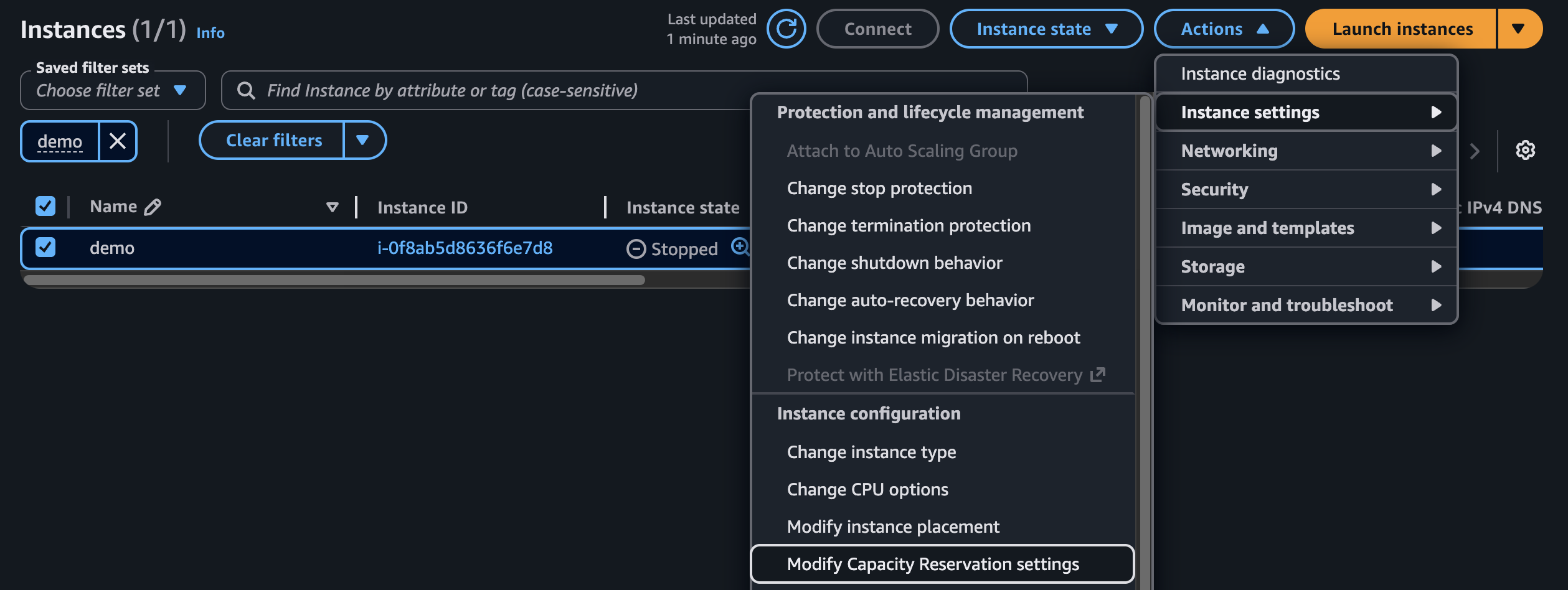
As long as the instance type, platform, and Availability Zone match the reservation, the instance can consume the reserved capacity without needing to be recreated.
This approach allows customers to continue using RONIN for instance provisioning and management while ensuring reserved capacity remains dedicated to a specific user, workload, or project.
Option 2: Future-Dated On-Demand Capacity Reservations
Future-Dated Capacity Reservations allow you to schedule a reservation ahead of time.
For example:
- Reserve GPUs for a workshop next month
- Prepare infrastructure for a teaching semester
- Schedule compute for a research project
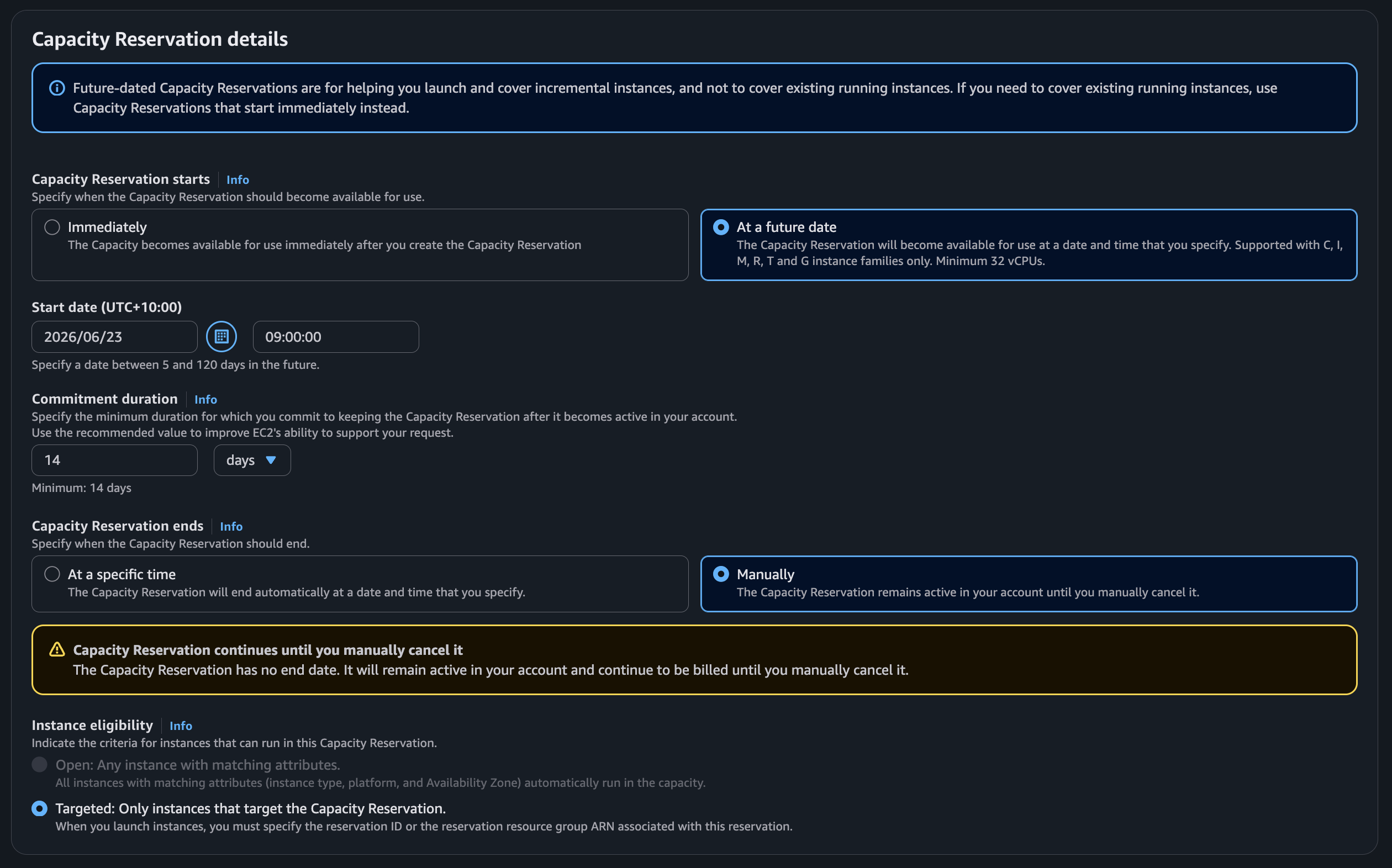
Important: 14-Day Minimum Commitment
Future-Dated Capacity Reservations require a minimum commitment period of 14 consecutive days.
Even if your actual workload only runs for a few days, you are charged for the full reservation period.
Example
Suppose you need:
- 8 × H100-backed P5 instances
- For a 2-day training workshop
A Future-Dated Capacity Reservation would still require paying for at least 14 days of reserved capacity.
In many GPU scenarios this becomes prohibitively expensive compared to alternatives.
Advantages
- Capacity can be planned ahead of time
- Works with many standard EC2 instance types
- Open reservations integrate with RONIN
Limitations
- 14-day minimum commitment
- Reservation creation is still subject to AWS capacity availability
- Can become expensive for GPU-based workloads
- Future-Dated Capacity Reservations must be created as Targeted Reservations and cannot be configured as Open Reservations. As a result, they do not integrate as seamlessly with RONIN and require some manual AWS-side management.
Option 3: EC2 Capacity Blocks for Machine Learning
For highly sought-after GPU resources, AWS introduced EC2 Capacity Blocks for ML.
Capacity Blocks are specifically designed for accelerator-heavy workloads where obtaining capacity at a specific future date is critical.
Typical use cases include:
- Foundation model training
- Research projects
- Large-scale inference testing
- AI workshops
- University teaching environments
Unlike traditional Capacity Reservations, Capacity Blocks provide a dedicated reservation window for supported GPU instance types.
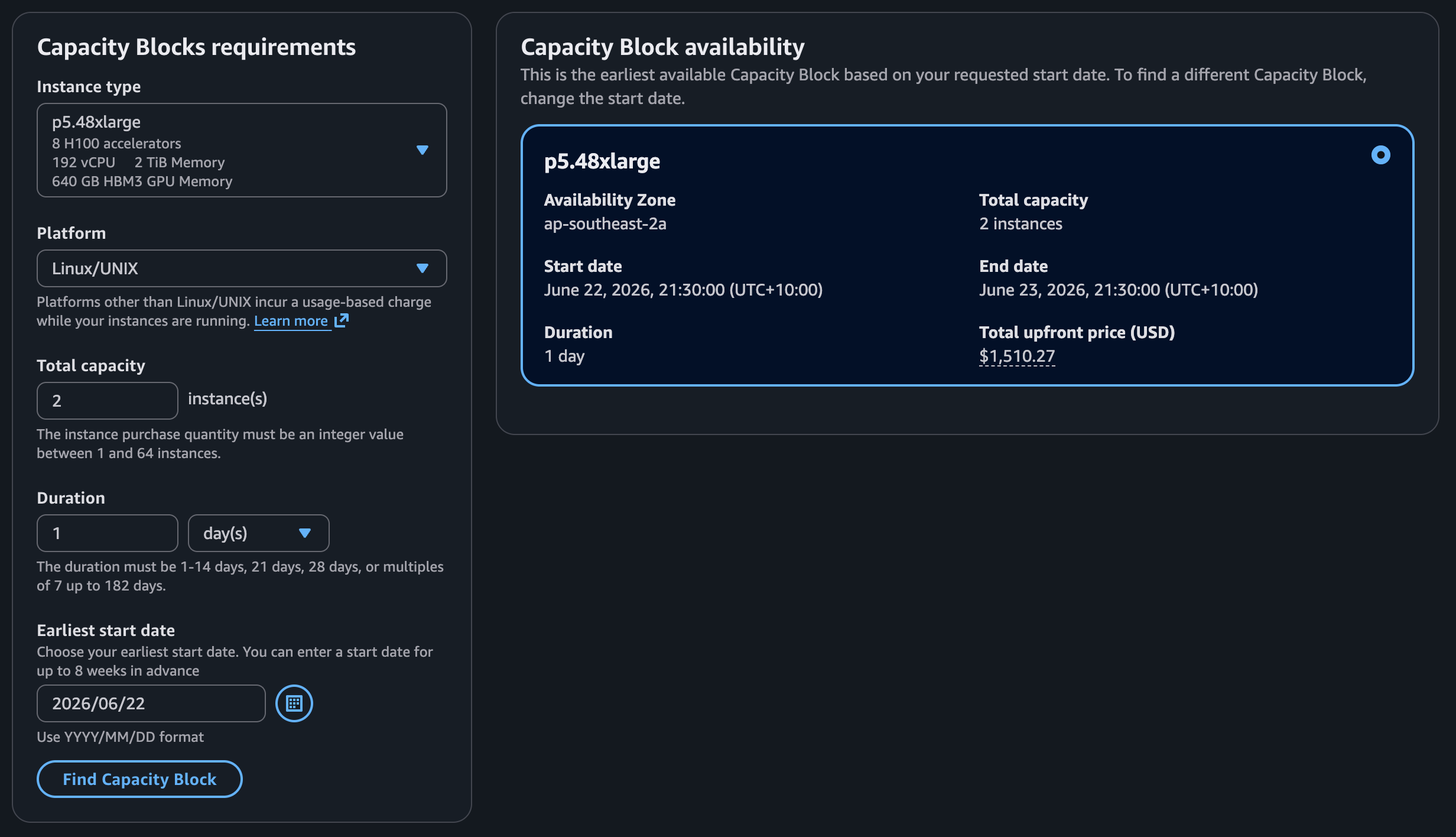
Key Characteristics
- Reserve capacity up to several weeks in advance
- Minimum reservation duration of 1 day
- Fixed reservation window
- One-time upfront reservation fee
- Guaranteed access during the reserved period
Supported Instance Types
AWS limits Capacity Blocks to selected accelerator-based instance families.
Availability changes over time, but typically includes high-demand GPU families such as:
- P4s
- P5s
- P6s
- Other supported ML accelerator instances
Always check current AWS documentation for supported instance types.
Why Capacity Blocks Are Often the Best Choice for H100 GPUs
When customers ask about securing H100 GPUs, Capacity Blocks are usually the most practical solution.
Traditional Capacity Reservations may:
- Fail due to insufficient capacity
- Require long reservation commitments
- Become very costly
Capacity Blocks were specifically created to address these challenges.
For workloads with a known start date, they are often the most predictable approach.
Important RONIN Considerations for Capacity Blocks
This is where Capacity Blocks differ significantly from other reservation types.
To use a Capacity Block reservation, instances must be launched with:
MarketType = capacity-blockCurrently, RONIN does not automatically launch instances using the capacity-block market type.
As a result:
- The Capacity Block must be purchased through the AWS Console.
- Instances must be launched through the AWS Console.
- The instances must be launched into the appropriate RONIN project subnet.
- Required RONIN tags must be applied to be ingested correctly.
- Once discovered by RONIN, users can manage and interact with the instances normally.
This is currently the recommended workflow when using Capacity Blocks.
Understanding the Cost Model
One of the most important concepts to understand is:
You pay for reserved capacity regardless of actual utilisation.
This applies to all reservation types.
If you reserve capacity and leave it idle:
- AWS still charges for the reservation
- Unused capacity is not refunded
- Partial usage does not reduce costs
Capacity reservations should therefore be carefully planned around known workloads.
Example Cost Scenarios
The following examples are illustrative only.
Actual pricing varies by region, instance type, operating system, and AWS pricing updates.
|
Scenario |
Reservation Type |
Notes |
|---|---|---|
|
1 × GPU for a few hours today |
Immediate Reservation |
May be suitable if capacity exists |
|
8 × H100 GPUs next month for 1 day |
Capacity Block |
Usually the preferred option |
|
50 student workstations for a semester |
Future-Dated Reservation |
May be appropriate if used continuously |
|
Large AI training run with fixed dates |
Capacity Block |
Designed specifically for this use case |
For example, reserving: 8 × P5.48xlarge instances for 1 day can represent several thousand USD in reservation charges alone, depending on region and current Capacity Block pricing.
Because Capacity Block pricing is dynamic and reviewed periodically by AWS, customers should always obtain a current quote before budgeting. AWS pricing consists primarily of an upfront reservation fee, with operating system licensing costs charged separately where applicable. AWS notes that Capacity Block pricing varies according to supply and demand.
Cost Attribution Within RONIN
A common question is whether reservation costs can be attributed to a RONIN Project ID (RPID).
In most cases, the answer is no.
This is because:
- Capacity reservation fees are paid directly to AWS
- Reservation fees are charged upfront
- Reservations themselves cannot be tagged with an RPID
- AWS billing reports do not naturally associate reservation fees with a specific RONIN project
As a result:
- Reservation costs are generally tracked separately
- RONIN usage reporting may not reflect reservation purchase costs
- Customers should account for reservation expenses independently
Final Thoughts
As demand for GPUs continues to increase, capacity planning is becoming an important part of running successful cloud workloads.
For most standard compute requirements, On-Demand Capacity Reservations can provide a straightforward solution.
For high-demand GPU resources such as NVIDIA H100 instances, EC2 Capacity Blocks are often the most reliable option, particularly when workloads have fixed dates and guaranteed access is required.
Recommended Decision Framework
|
Requirement |
Recommended Option |
|---|---|
|
Need capacity immediately |
Immediate On-Demand Capacity Reservation |
|
Need standard EC2 instances for an extended planned period |
Future-Dated On-Demand Capacity Reservation |
|
Need H100s or other high-demand GPUs on a specific future date |
Capacity Blocks |
|
Need guaranteed GPU availability for research or teaching |
Capacity Blocks |
|
Need automatic integration with RONIN |
Immediate On-Demand Open Capacity Reservations |
The key considerations to remember are:
- Future-Dated On-Demand Capacity Reservations require a 14-day minimum commitment.
- Immediate reservations have no minimum duration but depend on current availability.
- Open reservations work seamlessly with RONIN when instance and Availability Zone requirements match.
- If capacity needs to be dedicated to a specific user, workload, or RONIN project, a Targeted Capacity Reservation can be associated with an existing RONIN instance by modifying its Capacity Reservation targeting settings in AWS.
- Capacity Blocks are usually the best option for scarce GPU resources.
- Capacity Block instances must currently be launched via the AWS Console rather than directly through RONIN.
- Reservation charges are payable regardless of actual utilisation.
- Reservation costs cannot easily be attributed to individual RONIN projects.
If you are planning a research project, AI training workload, teaching environment, or GPU-intensive event and need guidance on the most appropriate reservation strategy, the RONIN team can help you evaluate the available options and operational considerations before committing to a reservation.