
Customising RONIN's Default Bucket Policy
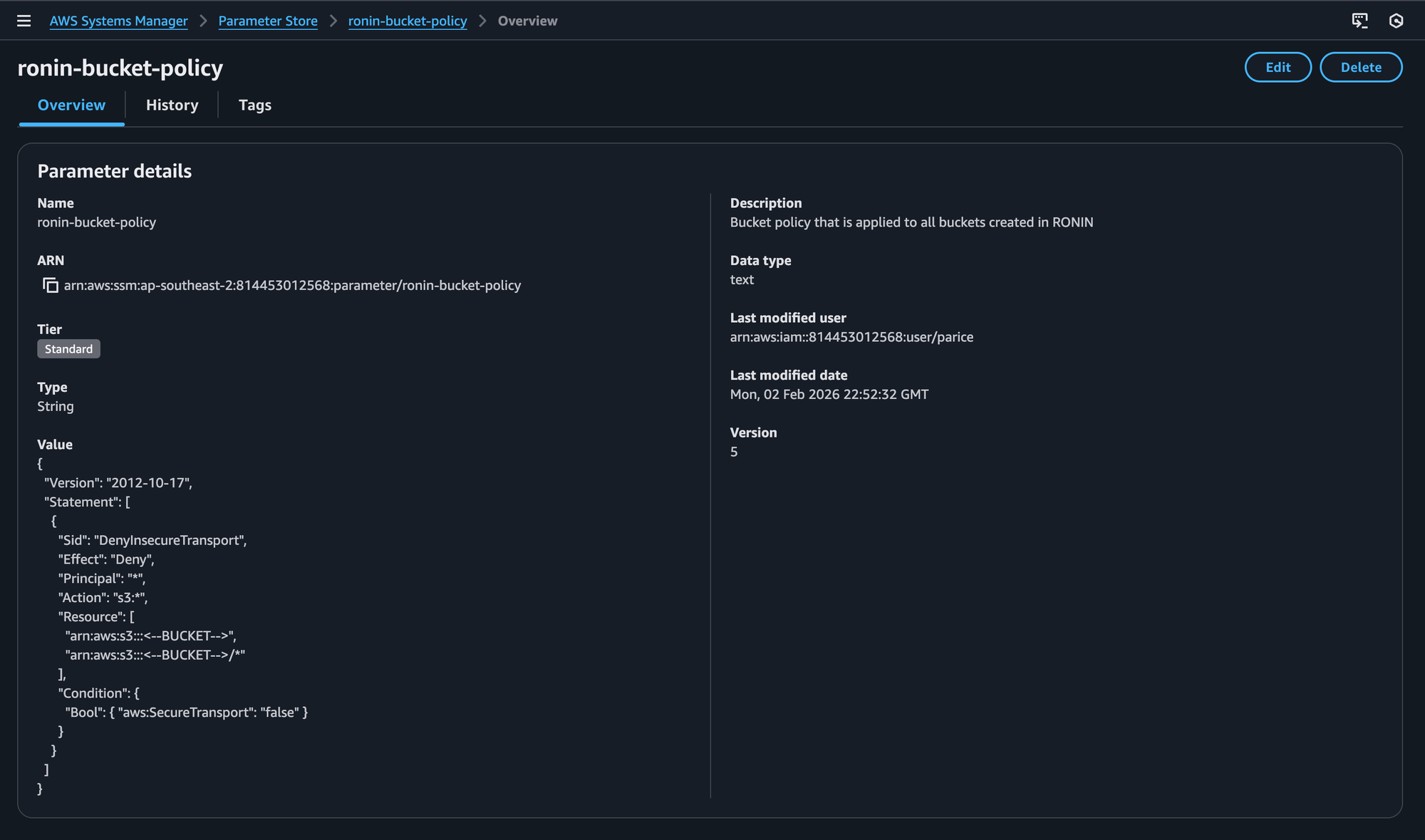
The "ronin-bucket-policy" parameter allows RONIN Admins to view and edit the default s3 bucket policy that is applied to all new buckets created by RONIN. This blog post walks you through the defaults, the differences in Core vs Isolate environments and the required placeholders.

We’re excited to announce a new feature that gives you more visibility and control over how S3 bucket policies are applied to buckets created through the RONIN UI.
Starting today, the default bucket policy that RONIN applies to newly created S3 buckets can now be viewed and edited, directly from the AWS console!
What’s changing?
Historically, default bucket policies behaved differently depending on your RONIN environment:
- RONIN CORE environments
- No bucket policy was applied by default.
- Customers could optionally add their own policies (for example, to restrict access to VPN traffic or allow access from other AWS services).
- The default behaviour was controlled internally by RONIN configuration.
- RONIN ISOLATE environments
- A default bucket policy was applied automatically.
- This policy enabled RONIN’s machine whitelisting.
- While secure, this policy could not be customized.
With this release, we’ve unified and simplified this experience across all RONIN accounts.
Introducing the ronin-bucket-policy parameter
Every RONIN customer account now includes a new parameter called: ronin-bucket-policy
This parameter contains the default S3 bucket policy that will be applied to all new buckets created via the RONIN UI, regardless of whether you’re using a CORE or ISOLATE environment.
This means, RONIN admins with access to the AWS account can now:
- View the default policy
- Modify it to meet your security or access requirements
- Apply changes without any RONIN-side configuration updates
RONIN will simply read this parameter and apply it automatically when new buckets are created (or when machine access permissions change in RONIN Isolate).
Environment-specific defaults
While the parameter is consistent across environments, the default policy contents differ slightly to match the security model of each environment.
RONIN CORE environments
The default bucket policy for CORE environments is intentionally minimal and secure by default. It:
- Enforces HTTPS-only access - Explicitly denies any requests made over HTTP
This provides a solid baseline while still allowing you to extend or customise the policy as needed.
RONIN ISOLATE environments
In ISOLATE environments, the default policy includes everything from CORE plus additional security controls:
- Enforces HTTPS-only access - Explicitly denies any requests made over HTTP
- Restricts bucket access to approved RONIN machine addresses - Explicitly denies all access outside of the allowed VPC source IPs (i.e. the RONIN machines that have been granted access via the RONIN UI)
This preserves the existing machine whitelisting behaviour, while now giving you the ability to customise or extend it.
Required placeholders
To ensure RONIN can correctly apply the policy at bucket creation time, the following placeholders must remain present when editing the policy:
- All environments
<--BUCKET-->This placeholder is replaced with the name of the newly created bucket.
- ISOLATE environments
<--ADDRESSES-->This placeholder is required for RONIN machine whitelisting and must be present in the relevant policy condition.
Removing these placeholders may result in invalid or non-functional bucket policies which will prevent the successful creation of buckets in the RONIN UI.
ronin-bucket-policy parameter must always contain a valid S3 bucket policy and cannot be left blank.Why this matters
This change gives you:
- More transparency into how bucket policies are applied
- More control over security and access rules
- Faster iteration, without waiting on RONIN configuration changes
- Consistent behaviour across CORE and ISOLATE environments
Most importantly, it puts bucket policy management where it belongs: in your AWS account, under your control.
What if I already had a custom bucket policy?
If you previously had a custom default bucket policy in place, you don’t need to worry about losing it.
As part of this change, any pre-existing custom bucket policy has been preserved and automatically set as the value of your ronin-bucket-policy parameter. This ensures that new buckets created through the RONIN UI will continue to use the same policy behaviour you had before, without interruption.
In other words:
- Your existing default behaviour remains unchanged
- No action is required on your part
- You can now view and edit that policy directly via the
ronin-bucket-policyparameter going forward
This update is designed to be fully backward-compatible while giving you more control moving ahead.
Getting started
You can view and edit the ronin-bucket-policy parameter today in your AWS account. Any updates you make will be automatically applied to new S3 buckets created through the RONIN UI going forward.
If you have questions or want help designing a policy that fits your use case, our team is always happy to help!